The latest release of Ecclesiact (
2.49.0.1915) comes with a surprise - bowing to popular public opinion, the ever expanding admin toolbar has now gone, and is replaced by a more conventional dropdown menu system which groups functions into categories.
BEFORE
Here's what the old toolbar looked like:

As you can see, there's no room for labels or per-item help. This meant that if you couldn't figure out what an icon meant you had to 'mouse-over' it to see a tooltip. To obtain help on a given topic you had to either click the yellow question mark at the end if the toolbar then navigate to the function in question, or open the report then find the yellow question mark inside that report to see it.
AFTER
And here's what we have now:
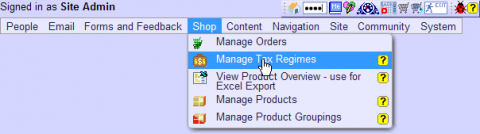
As you can see, items are now more clearly grouped by category (they were previously actually, but that grouping was a lot less obvious). In addition, words accompany each icon to describe the function, and where help is available for a given function, the icon for that help topic is right beside the item.
We don't like making big changes like this and try to do so very rarely (not least because all the screenshots in the help system itself and all the training manuals now have to be rewritten). In this case however, we think that once the shock has worn off, you'll quickly grow to love it.
Special thanks to James Fraser who was the first person to request, and then to develop a prototype of such a menu system about three years ago - that code never made it into the final build, but this one's dedicated to you, bud!